
How to Make LinkedIn Account for Job Seeking and Networking in 2026
The LinkedIn website is the largest professional networking site across the globe. People use the website to look for employment opportunities and build professional networks. If you have not yet signed up on LinkedIn, you should do it right away since the websites can be very useful to your futures career success.
Here are some tips on how to make a LinkedIn accounts to attract recruiters in2026.
What Is a LinkedIn?
LinkedIn is a professional networking platforms for peoples looking to develop their career & build personal brands. As compared to popular social media site such as Facebook & Instagram, LinkedIn focuses more on career & professional aspect. Users can interact & share ideas about the industry, promote their skills, recruit employee, & many other aspects.
What Can Peoples Do on LinkedIn?
LinkedIn provides people with various opportunities. Some typical things you can do when registered on LinkedIn are: how to create a LinkedIn account
- Look for job openings;
- Connect with professional in your fields;
- Promote yourself as a professional & builds your personal brand;
- Share information about your industry and contribute to discussions;
- Search for employees for your company;
- Promote your business; and
- Find freelance and consulting projects.
What Do You Need Before Making LinkedIn Account?
Before creating your LinkedIn account, you need the following things:
- Email address;
- Access to the Internet; and
- Your professional information (you can fill in this information later).
How to Create a LinkedIn Account
Step-1: Download the LinkedIn Apps
In your mobile phones, open Google Play Store/the App Store.
Find the LinkedIn application and download it.
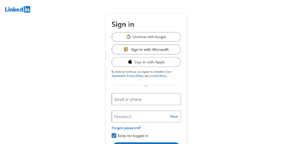
Step 2: Start Using the Application
Open the LinkedIn application and tap “Join Now”.
Step 3: Register via Email
Input your email address.
Click “Continue“.
Step 4: Set Up Your Password
Set up a secure password including:
- Uppercase letters;
- Lowercase letters;
- Numbers; and
- Symbols.
This will increase the security of your LinkedIn account.
Step-5: Input Your Names
Provides your first & last name.
You are recommended to use your real names because LinkedIn is a professional social networking platforms.
Step 6: Verify Your’s Email Address
You can receive a verifications code to your email accounts from LinkedIn. Type this code & confirm your’s email address.
Step 7: Provide Professional Details
You will be asked to provide your profession, company name, and other professional details.
You can add or modify your professional details later.
Step 8: Get Access to Your Profile
Now you have officially made your LinkedIn account.
How to Create a LinkedIn Account on Your Computer
Step 1: Go to the Website
Access the LinkedIn website in any browser.
Step 2: Register on the Website
On the homepage of LinkedIn, click “Join Now”.
Step 3: Enter Your Information
Input:
- Email address;
- Password; and
- First & last name.
Step-4: Confirm Your’s Email Address
Type the confirmations code in your emails inbox.
Step 5: Add Your Profile Picture and Other Professional Details
Provides other necessary details abouts you as a professionals.
How to Creates a LinkedIn Profiles
Creating an account does not means that you have done everything to make yourself visibles. The next steps is completing your LinkedIn profile & making sure that it looks attractives to recruiters.
Include Profile Photo
Add a professional profiles photo to your profiles. Avoid using blurry, groups, or other inappropriate image.
Write a Headline
Underneath your name, write a short headline. This headline should introduce you as a professional. Example of a good headline: “Digital marketing specialist with extensive experience in content writing.”
Describe Yourself
Provides a detailed description of your professional experiences, skills, & career goals in this sections. It should be short and to-the-points.
Add Your Work Experience
Write down the names of companies you worked at, your positions there, and some information about the main responsibilities at these jobs.
Provide Educational Information
Share your educational background and information about the colleges you studied at.
List Your Skills
Some examples of skills: SEO, graphic design, programming, project management, content writing, etc.
How LinkedIn Will Help You in Job Searching
LinkedIn has become one of the best job searching websites in recent years.
Search for Available Positions
Use the special “Jobs” section where you can look for job openings according to:
- Location;
- Industry;
- Job title; and
- Level of experience.
Apply Directly on LinkedIn
Most recruiters and employers allow you to apply directly via LinkedIn.
Get Job Opportunities Recommended by LinkedIn
According to your profile and interests, LinkedIn will recommend suitable positions for you to apply for.
Connect with Recruiters
Since recruiters regularly use LinkedIn for searching potential candidates, your chances to get noticed greatly depend on having a completed and professional profile.
Why Should You Network Professionally?
As mentioned above, professional networking is essential nowadays.
Meet Experts in Your Fields
Buildings a connection with professionals will helps you learn more abouts the industry.
Learn from Tops Professionals in the Areas
Following experts and companies will give you valuable insights into the area.
Find Career Opportunities
A lot of people found a job because of networking.
Build Your Personal Brand
Posting helpful content and becoming a leader in your niche.
Tips to Make LinkedIn Account Successful
There are several tips which will help you make your account successful on LinkedIn:
- Fill out your profile completely (100%);
- Use a professional profile photo;
- Add your relevant skills;
- Connect with professionals in your fields;
- Follow some companies and professionals in your niche;
- Post useful content;
- And keep information updated.
Common Problems Encountered During Registration
No Verifying Email Message
Check your email account. Your message could have been delivered in your spam or promotions tab.
You Need to Use a Different Password
When settings up your password, avoid usings easy words such as “password”. Also, makes sure your password includes some numbers & special characters.
Not All Your Fields Are Filled Out
LinkedIn will not let you continue unless your information is entered correctly and completely.
Conclusion
Creating your LinkedIn account should not be difficult. With our simple tips, you will be able to register and start using LinkedIn in 2026.